iPhone · on-device · no sensors
Score every stroke.
Train the gaps.
Film a session on your phone. FormCourt finds every swing in the clip, knows a serve from a forehand from a backhand, and measures 31 checkpoints across the three — in degrees, not adjectives. Then it builds the week of drills that fixes the weakest one. Your video never leaves the phone. Nothing is guessed.
iPhone · iOS 17 or later · free to install · three analyses a month free
- Serve, forehand and backhand — each with its own rubric
- One clip, every swing in it, typed and scored
- Analysis runs on your iPhone — video never leaves it
- Says PARTIAL when it can’t see enough, instead of inventing a number
-
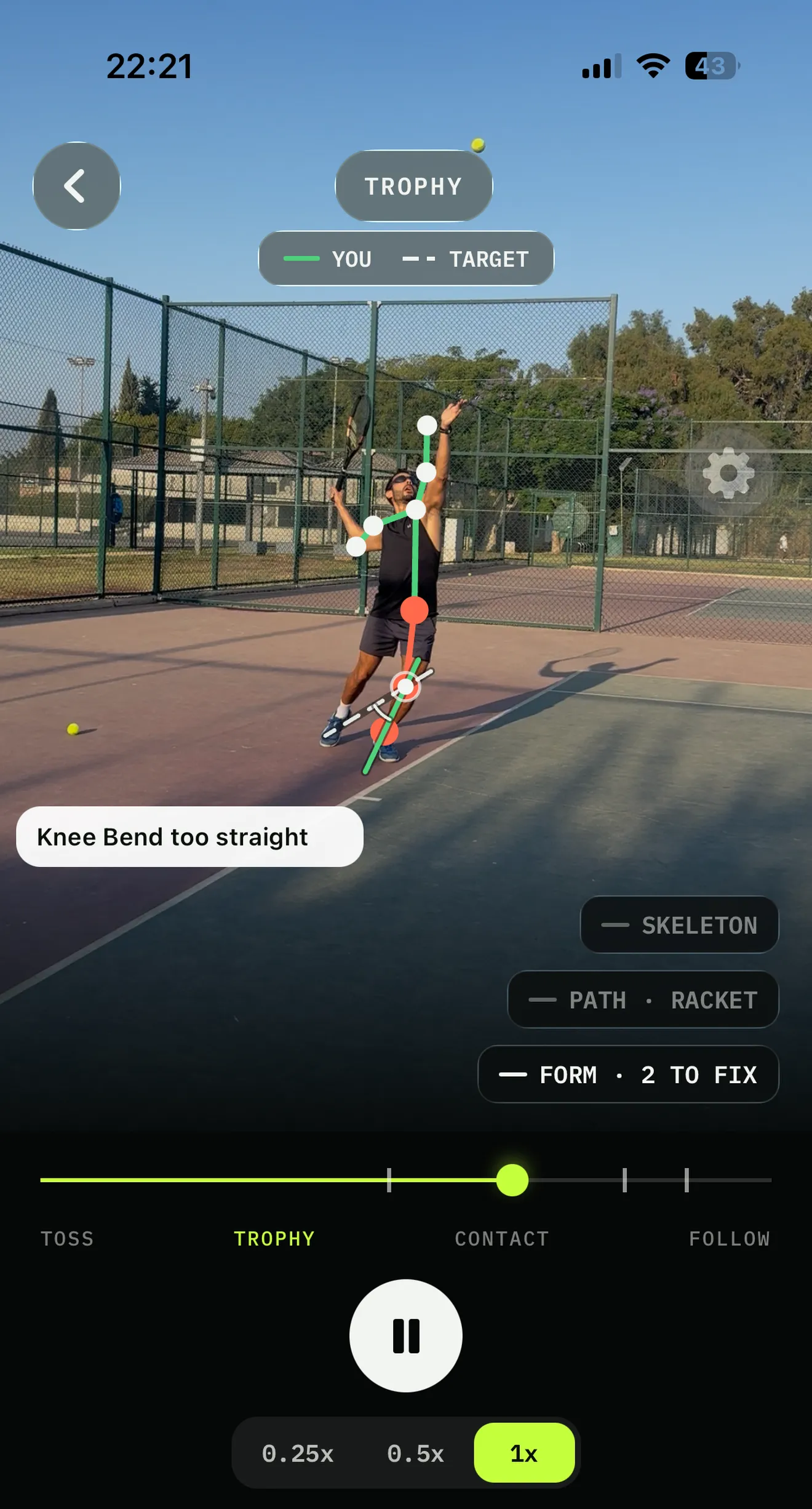
Your serve, measured
Your limb against the target limb
-
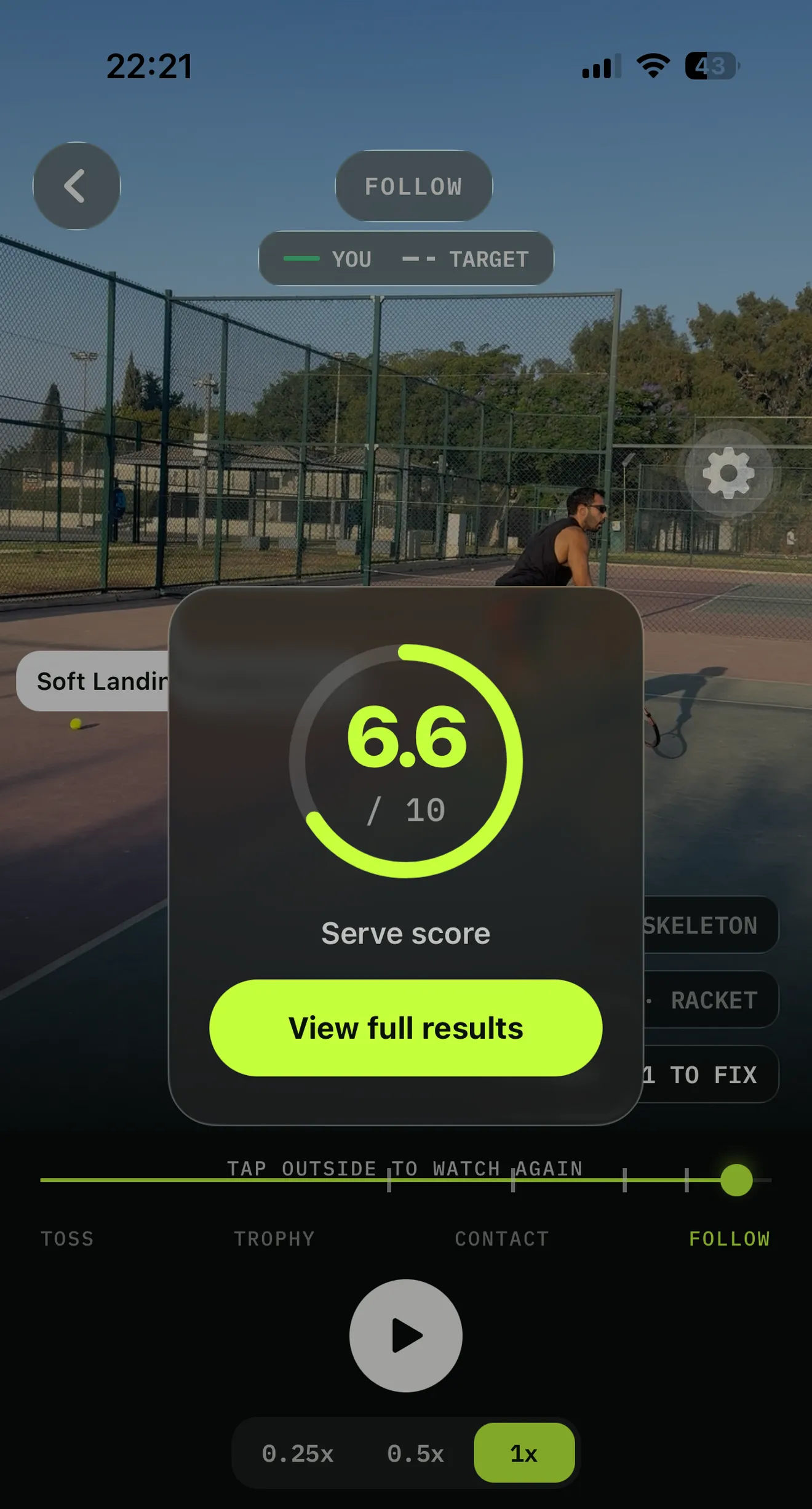
One honest number
Out of 10, on your own swing
-
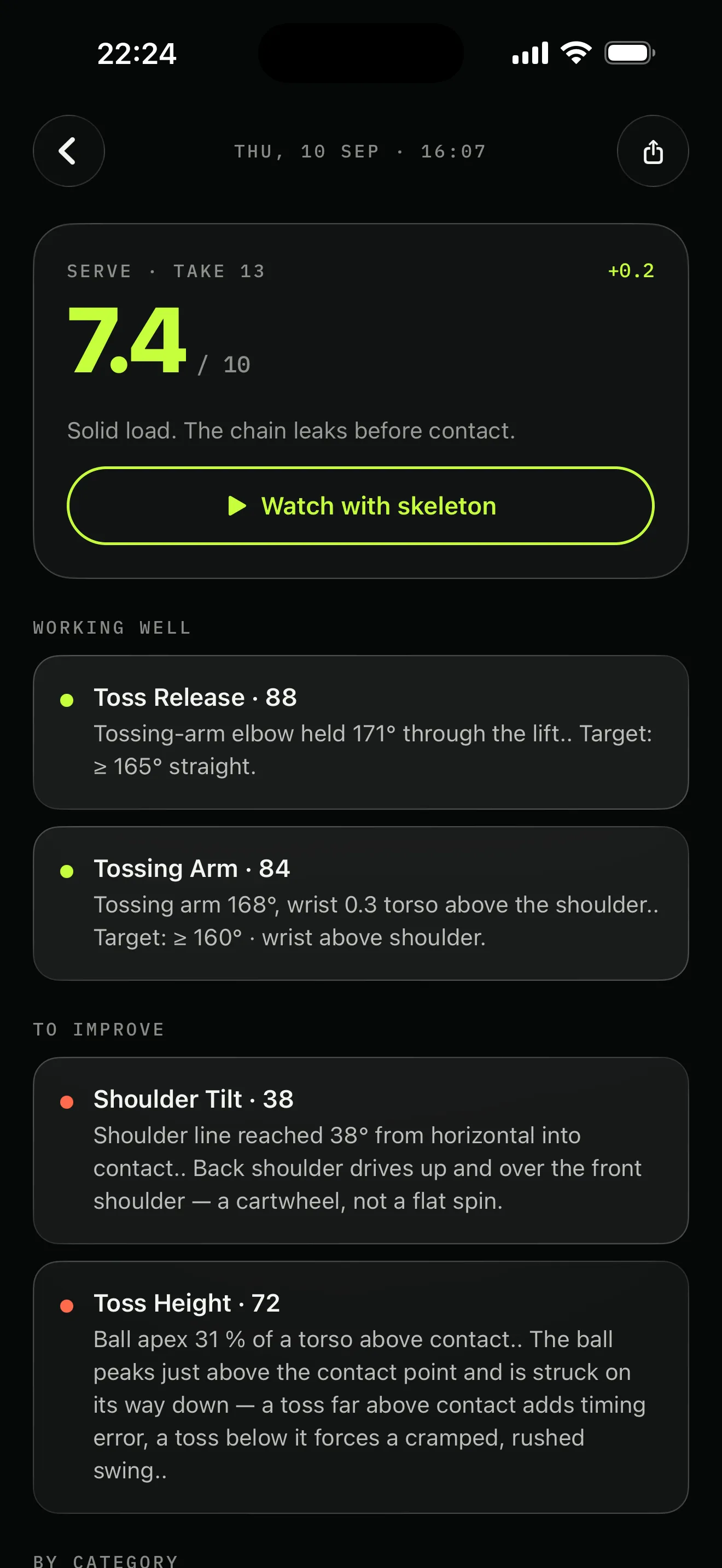
Every fault, named
With the number behind it
-
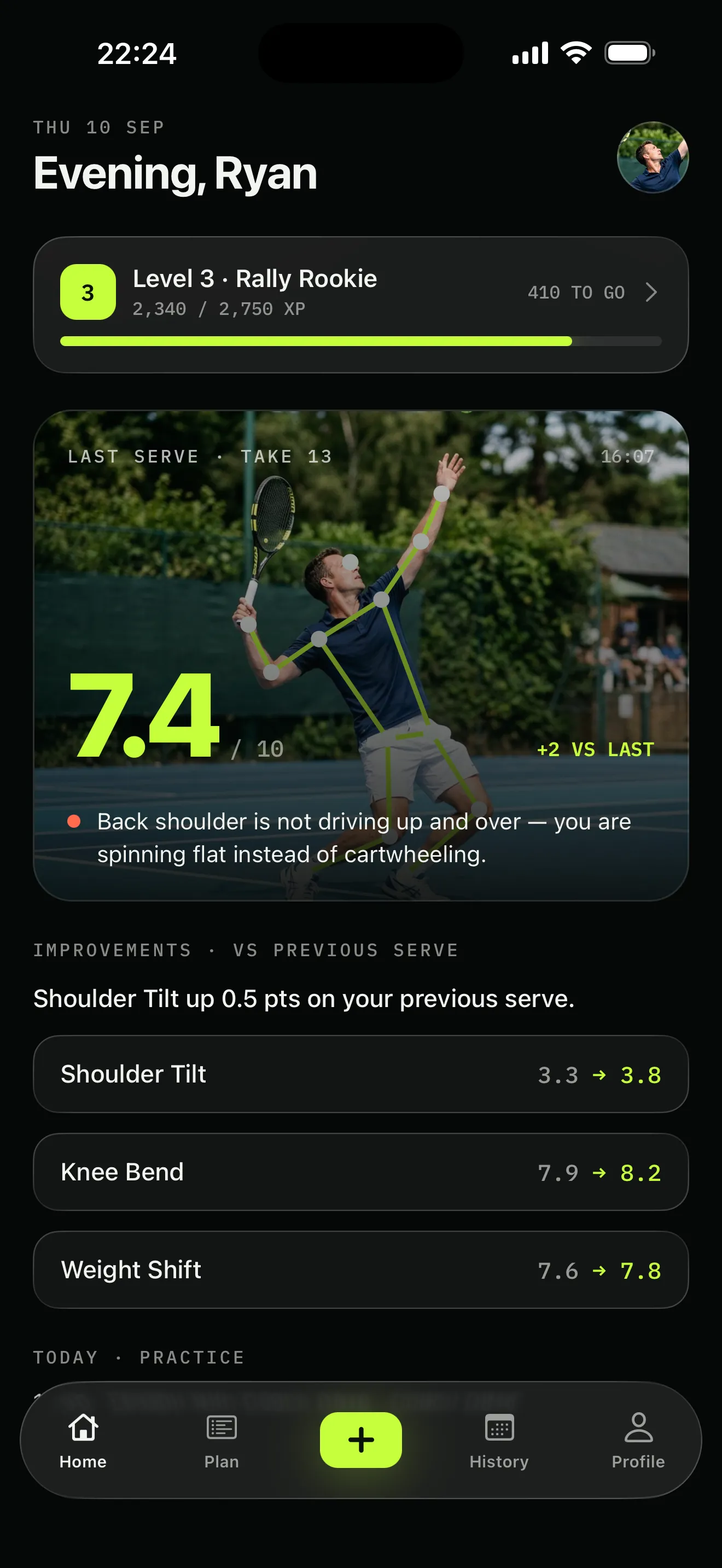
A score you can move
And what changed since last time
-
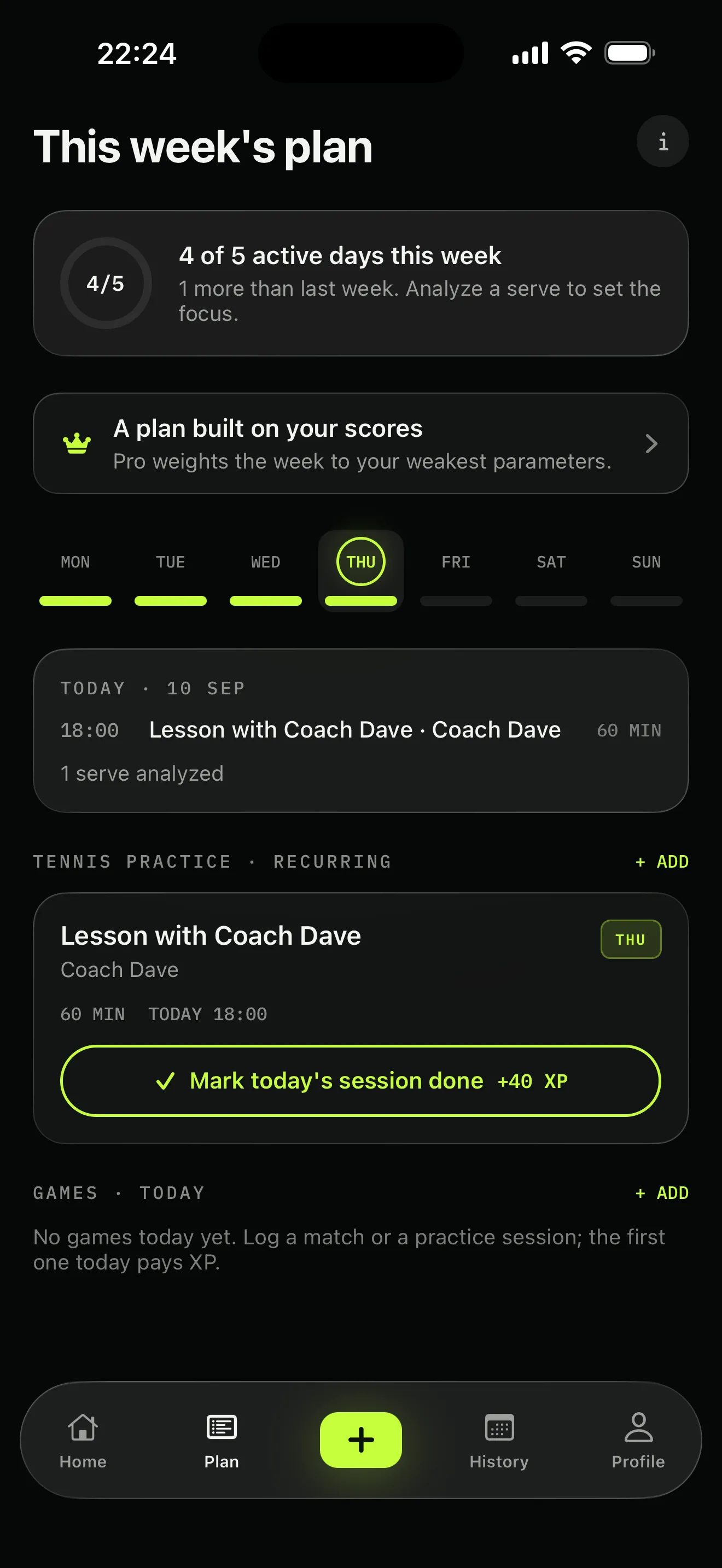
A week from your weak link
Around the days you actually play
-
Nothing to upload
It all happens on the phone
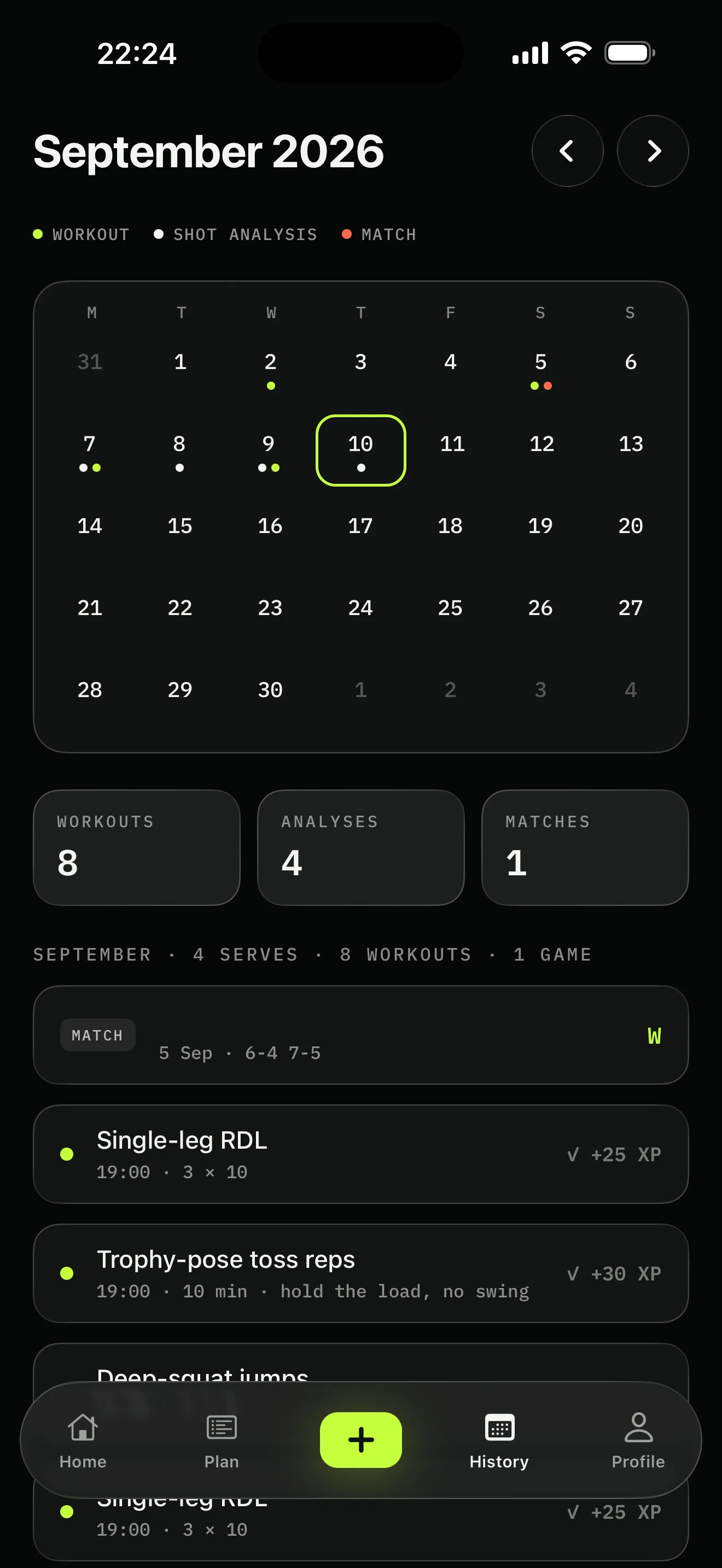
Every screen here is the real app, filled with sample data. “Ryan” is not a real user, and FormCourt has no App Store reviews to quote yet.
The gap
Every other app stops at the diagnosis.
You film a rally. Something tells you your racquet lag is low. Then what? You go back to the court and hit two hundred more forehands with exactly the same lag. The scoring is the easy half — the half nobody finishes is turning a number into what you do on Tuesday.
What you get elsewhere
- A score, and a vague category name
- Match stats: speed, depth, in or out
- One backhand rubric, so half of players score badly for no reason
- A drill library the size of a phone book, and no idea which two are yours
- A number even when the camera saw almost nothing
- Your swing on someone else’s server
What FormCourt does
- A score, plus the angle behind every point of it
- Mechanics: the cause, not the outcome
- One-handers and two-handers graded on their own terms
- Two drills tonight, chosen by your lowest measurement
- An honest PARTIAL when the frame was bad
- Your swing, on your phone, full stop
How it works
Film it. Read it. Fix it.
Three steps, about two minutes, no equipment you don’t already own.
- 01
Film a session
Prop the phone at hip height — side-on for serves, three-quarters behind for groundstrokes. A dashed silhouette shows you the framing and snaps to lime when you fit. Or skip filming and import something already in your camera roll.
- 02
Get the scores
The app splits the clip on racquet speed, types every swing it finds, tracks seventeen joints through each one and identifies its phases. Then it grades what it can measure against published elite ranges and shows you the number behind every bar. About fifteen seconds a swing on an iPhone 16 Pro — slower on an older phone — in airplane mode if you like.
- 03
Train the gap
Your lowest measured checkpoints — across all three strokes, not just the one you filmed most — become that week’s training. Power sessions and tennis drills are scheduled around the days you actually play, skip the muscles you’ve flagged as injured, and drop the jumping work the day before a match.
The score screen
Every bar has a number behind it.
Not “good rotation.” 118° of knee angle at the trophy frame. 0.41 of a torso of hip rise from trophy to contact. A shoulder line that reached 38° when the elite band starts at 35. Tap any row and it tells you what the camera measured, what the target is, and why it matters — sourced from the biomechanics literature, not from vibes.
Groundstrokes get the same treatment: racquet lag against the wrist, contact height against your hips, the low-to-high path angle, and the order your hips, shoulders, elbow and wrist fire in. Checkpoints the camera can only estimate are shown separately and kept out of your score.
See the whole rubric →Three strokes, three rubrics
A backhand is not a forehand with the numbers flipped.
Each stroke gets checkpoints derived from its own biomechanics, its own target ranges, and its own honest list of what the camera missed. The backhand goes further and bands its shared checkpoints by style, because grading a one-hander against a two-hander’s ideal is worse than not grading it at all.
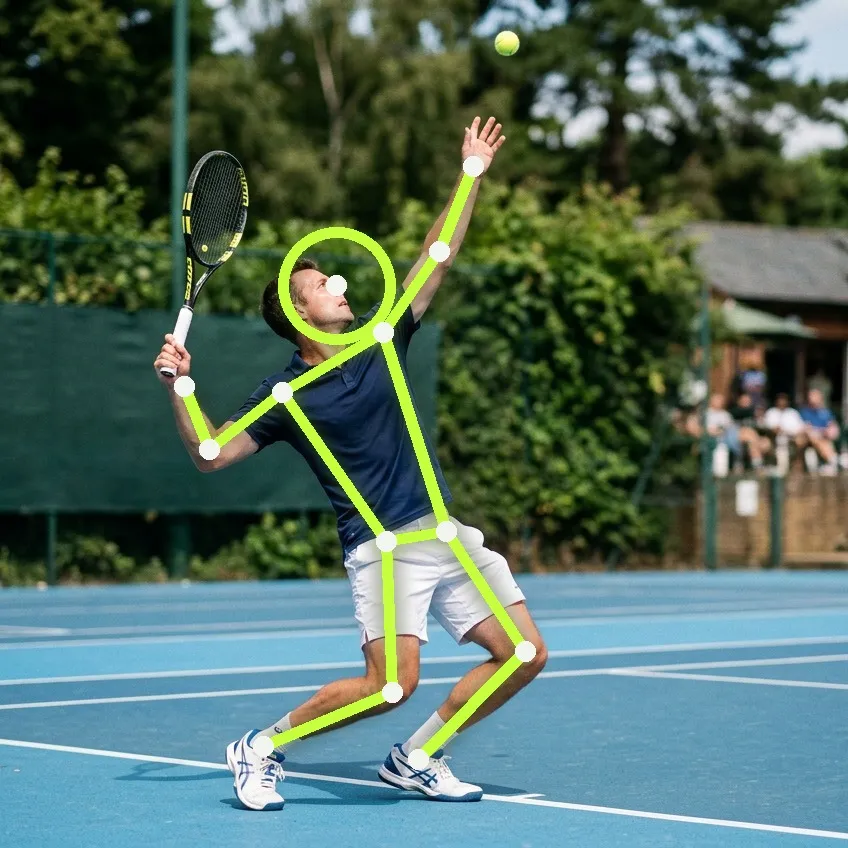
Serve
11 measured · 5 est. · 5 checklist
Toss, trophy, racquet drop, contact and landing — five phases, graded against published elite ranges.
SEE THE RUBRIC →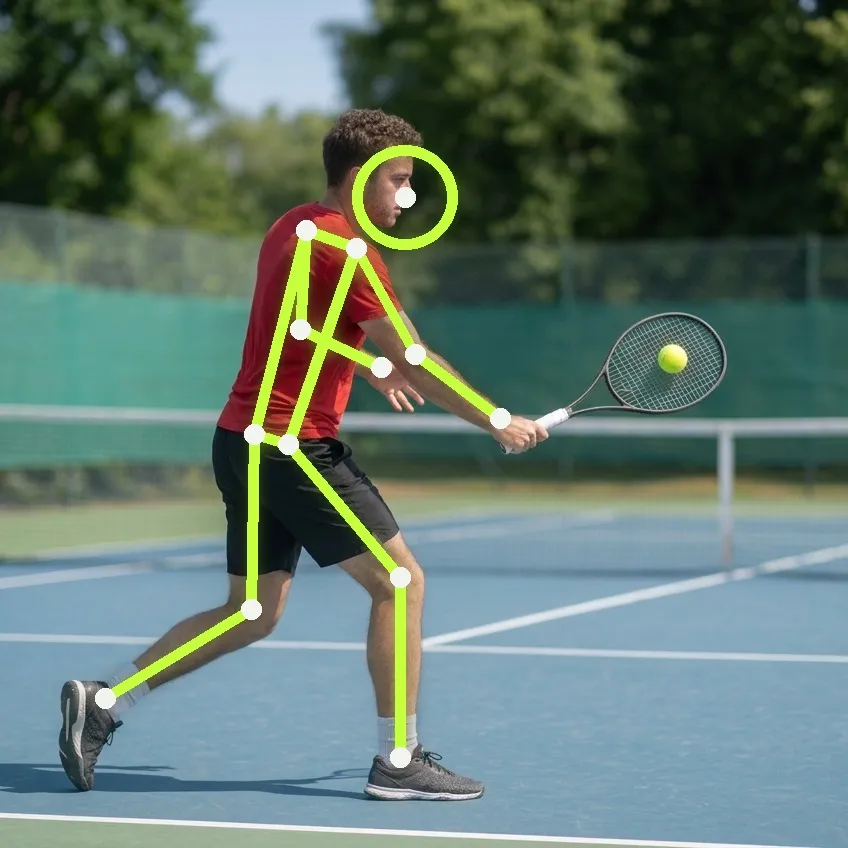
Forehand
10 measured · 6 est. · 2 checklist
Unit turn, leg load, racquet lag, the kinetic-chain order, contact height and spacing, and where the finish ends up.
SEE THE RUBRIC →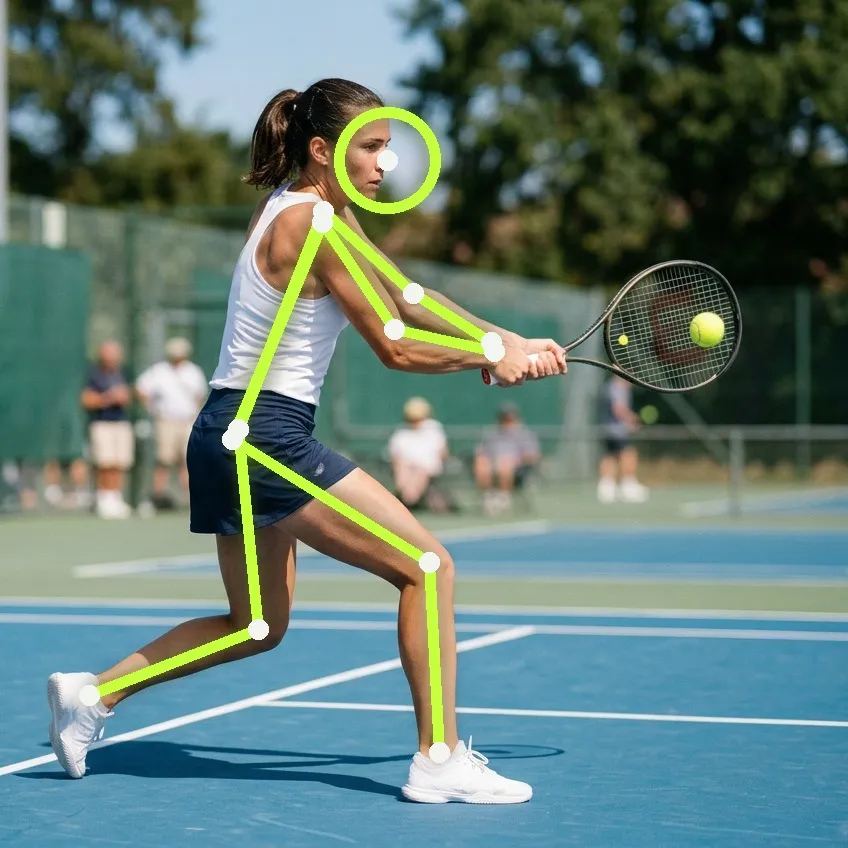
Backhand
10 measured · 6 est. · 1 checklist
One-handed and two-handed, graded on their own terms — racquet high point, rear-leg load, lag, contact, and whether you stayed sideways.
SEE THE RUBRIC →Each rubric page opens with that stroke shot phase by phase — the five positions the checkpoints are measured at.
Smashes and volleys are recognised and listed with a COMING chip — found, but not scored until they have a rubric of their own.
One clip, a whole session
Stop filming one swing at a time.
The reason technique apps go unused is the ritual: film, trim, upload, wait, repeat. FormCourt takes the recording you were going to make anyway — a basket of serves, twenty minutes of rallying — and does the splitting itself.
- 01
Split
Swings are separated on hitting-point speed peaks, with the racquet head tracked when it is visible and the wrist when it is not.
- 02
Type
Each swing is classified — serve, forehand, backhand, smash, volley — from its shape, not from you telling it.
- 03
Score
The ones with a rubric are graded. The rest are listed honestly, so you can see the app found them.
- 04
Keep
Every swing arrives ticked. Untick the mishits, save the rest in one tap, and your history fills up in a session instead of a season.
And you can always overrule it: drag a window over the swing you meant, pinch to zoom, and analyse that part instead. The automatic split is the default, not the only way in.
The training plan
The half nobody else builds.
FormCourt reads your recent scored strokes, finds the checkpoints you rank lowest on, and writes the week around them. Your goal changes the whole shape of it: a serve-power week leads with legs, then rotation, then arm. A whole-game week leads with tactics and movement. Court days get short sessions with no jumping in them.
- Built from your numbers. The drill card names the checkpoint that put it there.
- Fits your real week. Tell it which days you play and when your lesson is; it works around them.
- Works around what you flag. Flag a shoulder and every drill that loads it leaves the catalogue. It is a filter you control, not a medical assessment — and what you flag stays on your phone.
- Swap anything. Long-press a drill for alternatives that train the same checkpoint.
- A streak you can actually keep. One active day a week counts — a saved stroke, a ticked drill, a logged match, a lesson.
Progress
One swing is a snapshot. Twenty is a coach.
Every scored stroke is stored with its numbers, so the checkpoint you are working on becomes a line you can watch move — per stroke, so a forehand that improved does not hide a backhand that did not. Home opens on your last analysis and what changed since the one before it.
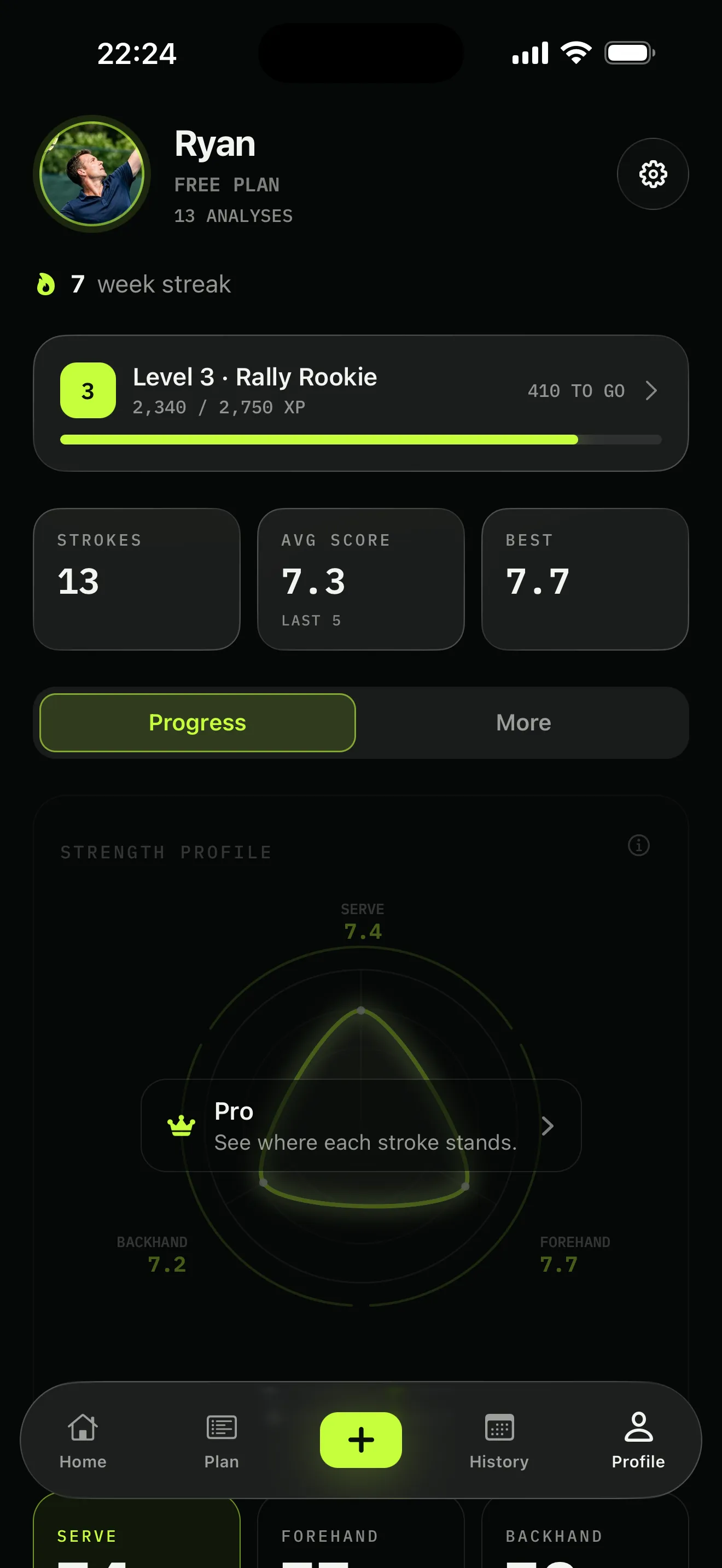
Screenshots are of the real app, filled with sample data. "Ryan" is not a real user.
Privacy by design
Your swing never leaves your phone.
This isn’t a policy promise, it’s the architecture. The pose models ship inside the app and run on the Neural Engine. There is no upload step for your footage to opt out of, because your footage is never sent anywhere. What can leave, if you choose an account, is the numbers — and crash reports, which every app sends. The privacy policy lists all of it.
On device
Swing detection, stroke typing, phase finding and scoring all run locally. Airplane mode works.
Results only
Make an account and under two kilobytes of numbers per stroke syncs so your history survives a new phone. Video, pose tracks and any injuries you flag never do.
Yours to delete
One tap wipes the phone — history, clips and stills. One more deletes the account and every row attached to it, for real.
Pricing
A year costs less than one lesson.
A private lesson runs $60–100 an hour, and a year of FormCourt is one of them. Every tier below covers all three strokes — there is no “forehand pack”, and nothing that already works gets taken away later.
Monthly
$12.99 / month
Cancel any time
For a season, or for finding out whether this actually changes anything.
- Unlimited analyses of every stroke
- Multi-swing clips — a whole basket at once
- Every measured checkpoint with its number
- A weekly plan rebuilt from your scores
- Progress trends and your strength profile
- Cloud backup of results (never video)
- Every new stroke rubric as it ships
Annual
$79.99 / year
$6.67 a month · 1 week free
Launch price, locked for as long as you stay subscribed.
- Unlimited analyses of every stroke
- Multi-swing clips — a whole basket at once
- Every measured checkpoint with its number
- A weekly plan rebuilt from your scores
- Progress trends and your strength profile
- Cloud backup of results (never video)
- Every new stroke rubric as it ships
iPhone · iOS 17 or later · free to install · three analyses a month free
Three analyses every month are free, no card and no account. The app itself is free to install.
Subscriptions are sold by Apple through in-app purchase. Prices are in USD and charged in your local currency; both plans renew automatically at the same price unless cancelled at least 24 hours before the period ends, and are managed in your Apple ID settings, not here. The annual plan's free week converts to a paid year unless you cancel inside it. See terms and refunds and cancellation.
FAQ
Questions people actually ask
Which strokes does it score?
Serve, forehand and backhand — all three have a full rubric and a real score today, across twelve scored categories and 31 measured checkpoints. One-handed and two-handed backhands are graded on their own terms rather than against a single ideal. Smashes and volleys are recognised in a clip and listed so you know they were seen, but they carry a COMING chip instead of a score until their rubrics ship.
Can I film a whole session at once?
That is the intended way to use it. Point the phone at yourself, hit a basket or play a set of rallies, then import the clip once. FormCourt finds every swing in it, types each one — serve, forehand, backhand, smash, volley — scores the ones that have a rubric, and lists them so you tick which to keep. You are not filming one swing at a time and you are not trimming clips by hand.
Do I need a tripod, a sensor, or a special camera?
No. Lean your phone against a bag at roughly hip height — side-on for a serve, three-quarters behind for groundstrokes — far enough back that your whole body and the top of your reach fit in frame. FormCourt draws a live silhouette guide while you set up, and the guide turns lime when the framing is good. No wristband, no racquet sensor, no court-side rig.
Does my video get uploaded anywhere?
Never by default. Pose detection and scoring run entirely on your iPhone’s Neural Engine — the clip and the pose track stay in the app’s private storage on the device. If you make an account, only the results sync (numbers and short text), so your history survives a new phone. There is no server that has ever seen your swing.
How accurate is it, honestly?
Accurate on what a 2D camera can actually see, and openly silent on the rest. Across the three strokes, 31 checkpoints are measured from your joints and graded against published elite ranges; 17 more are labelled estimated and deliberately excluded from your score; 8 — grip and forearm pronation among them — are marked as things the camera cannot see at all and stay on a checklist. If a swing is missing too many measurements it is flagged PARTIAL rather than quietly scored. The whole rubric is published.
How is this different from SwingVision?
SwingVision measures the match — shot speed, depth, in or out, line calls. FormCourt measures you — the mechanics that produced the shot — and then writes the off-court and on-court training that fixes the weakest link. They answer "what happened in the point." We answer "why your backhand does that, and what to do on Tuesday." Many people will want both — they answer different questions.
Will it replace my coach?
No, and it is not built to. A coach sees the things a camera cannot — grip, intent, what you do under pressure. FormCourt is the measuring tape between lessons: it tells you whether the thing your coach asked for last week actually changed, in degrees.
Android?
Not yet. FormCourt is iPhone-only, because the whole analysis pipeline is tuned to the Neural Engine and the pose models ship inside the app. An Android port is a rewrite of the part that matters, not a checkbox — if you want one, say so at support@formcourt.com and it goes on the pile that decides what gets built after 1.0.
Out now
Score your next session.
FormCourt is built in the open by one developer who plays at 3.5 and has the backhand to prove it. It is free to install, three analyses a month cost nothing, and your video never leaves the phone.
iPhone · iOS 17 or later · free to install · three analyses a month free